How to Check Your MacBook Battery Cycles and Monitor Long-Term Health Performance
Understanding MacBook Battery Health
The MacBook battery is one part of the Apple laptop that you want to check when buying a used MacBook Pro or MacBook Air. Besides the SSD or hard drive, this is one of the few parts that can break due to "wear and tear". But how exactly can you check battery health?
Battery health low or cycles high?
We replace batteries and check the charging electronics. Free diagnosis.
Contact us or see battery replacement.

What is a Charge Cycle?
A charge cycle is complete when you have used (discharged) an amount that equals 100% of the battery's capacity – not necessarily all from one charge. So the counter is not the number of times the battery was charged from 0% to 100% and run down again, but how often its full capacity has been used up in total.
Since most people don't discharge their MacBook Pro/Air from 100% to 0%, but only partially, for example from 100% to 55%, the question is how partial discharges add up to one cycle.
With such partial discharges, the percentages are simply added up and each time you reach 100%, the number of charge cycles increases by 1.
Practical Example:
- Discharge from 100% to 75% (then charge) = 25%
- Discharge from 100% to 27% (then charge) = 73%
- Discharge from 100% to 58% (then charge) = 42%
Result: That's a total of 140% discharge, so we have about 1.4 charge cycles on the battery counter.
Check Battery Cycles and Battery Health
Read MacBook Battery Cycles – Step-by-Step Guide
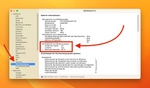
To read the battery cycles and battery health (Maximum Capacity) on MacBook Pro or Air, there's a simple way through System Settings (works in macOS Ventura and all newer versions; on Monterey: Apple menu → About This Mac → System Report):
- Open System Settings (via Apple menu or Spotlight)
- Select "General" in the sidebar
- Select "About" on the right side
- Click "System Report" at the bottom of the About section
- Expand "Hardware" on the left side
- Under "Hardware", select "Power"
- Here you'll find the important values:
- "Cycle Count"
- "Condition"
- "Maximum Capacity"
What Does "Maximum Capacity" Mean?
The "Maximum Capacity" value indicates how much capacity the installed battery still has compared to a new battery. This value decreases over time for every battery. For a new MacBook, this value is 100%.
Evaluating Battery Health
The battery health assessment is shown under System Settings → Battery as "Battery Health": "Normal" means the battery is functioning normally; the other value Apple shows there is "Service Recommended". In the System Report the "Condition" line carries the assessment.
Important: Apple rates the battery of every MacBook Air since late 2010 and every MacBook Pro since 2009 for 1,000 charge cycles, and it is designed to retain up to 80% of its original capacity up to that count. Once the count is reached, Apple recommends a new battery to maintain performance – the MacBook keeps working, only with a shorter battery life, and a MacBook battery replacement becomes interesting.
Properly Evaluating MacBook Battery Cycles and Battery Health
Normally you would say that a high number of charge cycles is bad and a low number is good. In practice, it's not quite that simple. The reason is that it's also harmful for batteries to be kept at 100% (fully charged) for long periods.
This happens when people use their MacBook Pro/Air almost exclusively at home at their desk and it's plugged in all the time. So after a year you might have 10 charge cycles, but the battery has still lost a lot of "battery health".
Apple's "Optimized Battery Charging" Since 2020
Since 2020, Apple has built a feature called "Optimized Battery Charging" into macOS that addresses exactly this problem. macOS learns your daily charging routine and delays charging past 80% when the MacBook is likely to stay connected to power for an extended period – this shortens the time the battery spends fully charged, which is good for its lifespan.
When Buying Used
When buying used, you should always ask the seller for a screenshot showing all three values:
- Cycle Count
- Condition
- Maximum Capacity
Only with this can you really tell the actual state of the battery. If the maximum capacity is only 80% or below, a battery replacement is due soon. Keep this in mind during price negotiations.
Service and Further Information
Battery Replacement at Sadaghian
If you have a MacBook Pro or Air that needs a battery replacement, please contact us. We offer MacBook battery replacement at a fixed price.
- Replacement batteries for all MacBook models
- Installation in our Hamburg workshop
- 12-month warranty on the repair
We can replace batteries on both old and new MacBook models (including all M-series machines), so your MacBook lasts a full day away from the charger again. Current prices for battery replacement can be found in our price overview.
Contact us for a free consultation:
Conclusion: Check Battery Health Regularly
Regular checking of MacBook battery health is important to recognize in time when a battery replacement is required. With the method described, you can quickly and easily retrieve all important information about your MacBook battery.
If your MacBook has other problems, remember: A repair at Sadaghian is often easier and cheaper than you think. We repair MacBooks of all generations – from classic Intel models to the latest Apple Silicon MacBooks.